Burn Permit Management
Replace phone calls and paper forms with an online system that handles everything — from the resident's application to weather checks to automatic notifications. Your residents apply from their phone. You approve from yours.
The Old Way Doesn't Work
Residents call you at dinner, leave voicemails, or show up at the station hoping someone's there. You scribble on a notepad, hope you remember to check the weather, and pray nobody burns on a red flag day. Sound familiar?
Phone Tag
Residents call the chief's personal cell. Missed calls mean missed permits — or people burn without one.
Paper Trail
Handwritten permits in a binder at the station. No way to track who's burning, when, or if conditions are safe.
No Weather Checks
Nobody's checking wind speed and humidity before approving. One bad day and a controlled burn becomes a wildfire.
How It Works
From application to completion in four steps — no phone calls, no paper, no guesswork.
Resident Applies Online
Residents visit your department's burn permit page from any device. They fill out what they're burning, where, and when — including drawing the burn area on a map. No account needed, takes about 2 minutes.
- Works on any phone, tablet, or computer
- Draw burn area on an interactive map
- Photo upload for the burn site
- Digital signature — no printing needed
- Share your link with a QR code at the station or on your website
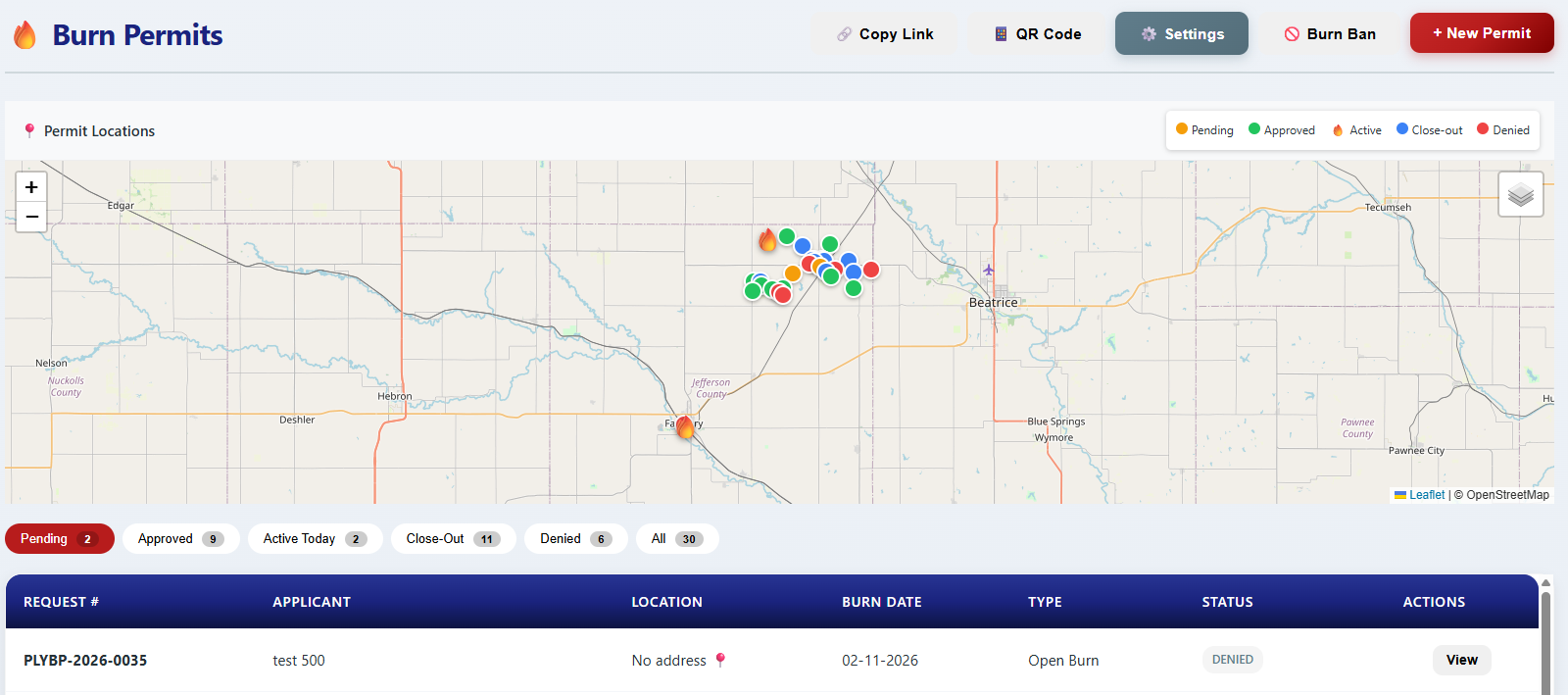
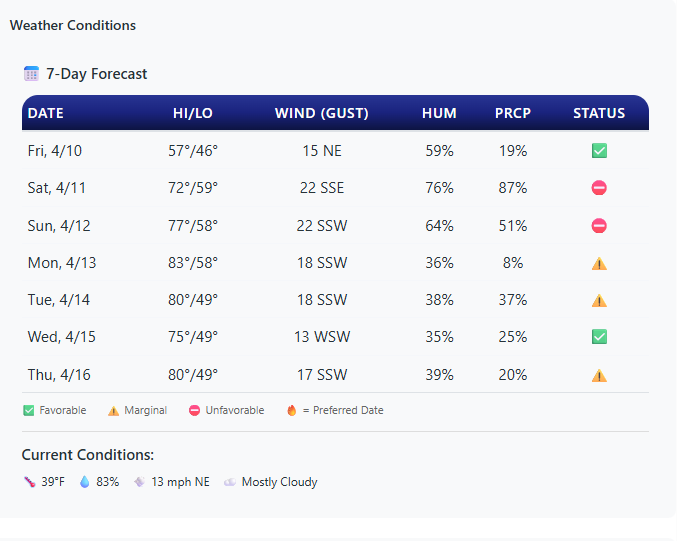
Weather Gets Checked Automatically
When a permit comes in, the system pulls the 7-day weather forecast from the National Weather Service for the exact burn location. You see wind speed, humidity, and fire danger level at a glance.
- NWS forecast for the specific GPS coordinates
- Color-coded fire danger indicators (Low, Moderate, High)
- Red Flag Warnings automatically block approvals
You Review and Approve
Open the permit on your phone, see the map, weather, and details. Approve, deny, or ask for more information — all from wherever you are. No trip to the station needed.
- Push notification when a new application comes in
- Approve or deny with one tap
- Add conditions or notes to the permit
- District auto-routing sends permits to the right department based on location
Applicant: John Smith
Type: Grass/Vegetation
Date: Saturday, April 12
Location: 2450 County Rd 12
Weather: Low fire danger
"Your burn permit for 2450 County Rd 12 has been approved. Valid April 12-19. Conditions: Call before igniting..."
"Plymouth VFD: Burn permit #BP-042 APPROVED. Valid 4/12 to 4/19. See email for details."
"New burn permit approved for 2450 County Rd 12 — John Smith, valid April 12-19"
Residents Get Notified Automatically
The moment you approve or deny, the resident gets an email — and a text message if they opted in. No phone call back, no "did they get the message?" — it's handled.
- Email notification on approval, denial, or revocation
- Opt-in SMS alerts — applicants get a text on approval, denial, burn bans, and revocation
- Automatic burn ban notifications to all active permit holders
Burn Ban Management
When conditions get dangerous, activate a burn ban with one click. Every active permit holder gets notified instantly.
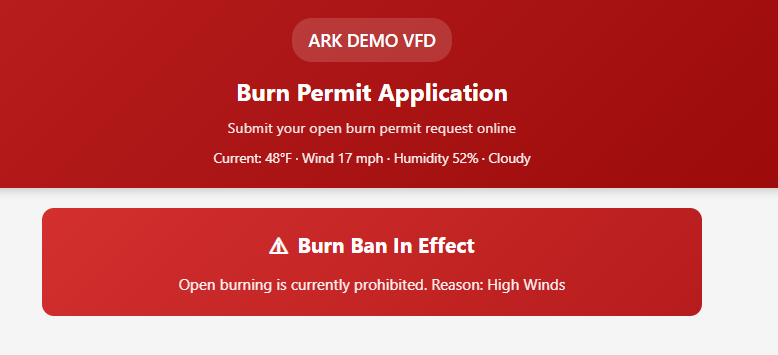
One-Click Burn Bans
Activate or deactivate a burn ban instantly. All new permit applications are automatically blocked during a ban.
Automatic Notifications
Every active permit holder gets an email — and a text message if they opted in — the moment a burn ban goes into effect. No calling down a list.
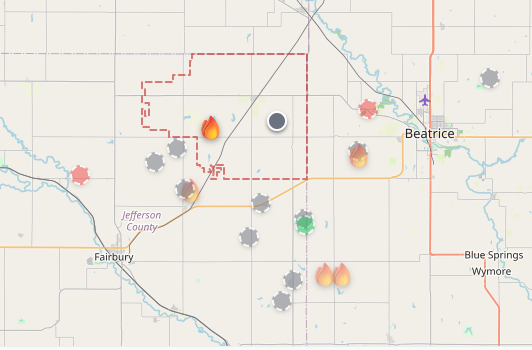
NASA Satellite Fire Detection
FIRMS satellite data overlays active fires on your permit map. See hot spots in your district in near real-time.
District Auto-Routing
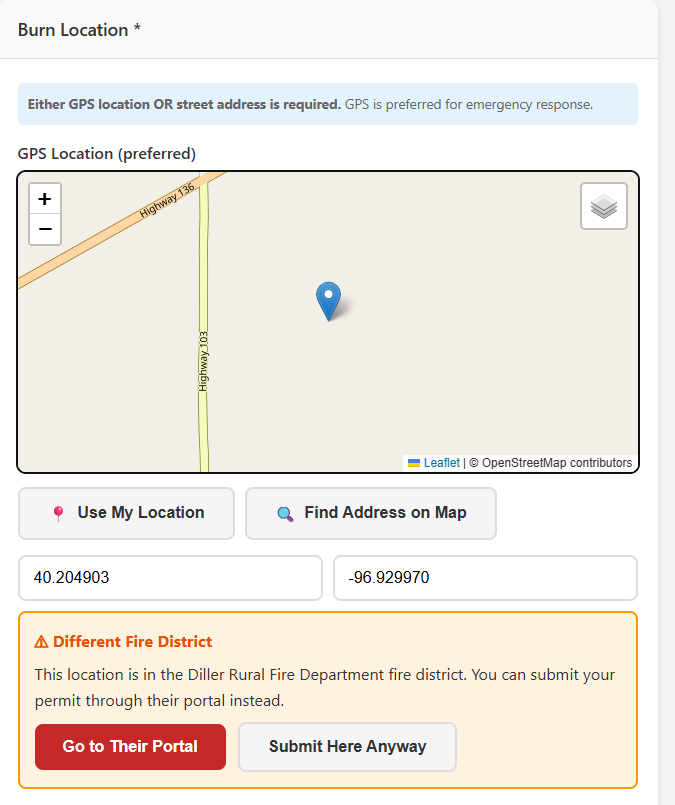
When a resident applies for a burn permit, the system checks their location against fire district boundaries. If they're in the wrong district, the applicant is told which department covers their area and can be redirected to the correct portal. If both departments are on ARK, the permit is forwarded automatically.
- GPS-based district boundary matching
- Automatic forwarding between ARK departments, or redirect to the correct district
- Neighboring departments can see active permits near their borders
Easy for Your Residents
Share your burn permit link on your website, Facebook page, or print it as a QR code for the station counter. Residents apply in 2 minutes from their phone.
Scan QR Code
At the station, on a flyer, or from your website
Fill Out Form
Name, address, what they're burning, and when
Draw on Map
Mark the exact burn area on an interactive map
Get Approved
Email and text notification when their permit is ready
Stop Playing Phone Tag Over Burn Permits
The burn permit module is available as an add-on for any ARK Fire RMS department. See it in action with a free demo.